
In this article, I will use the FreeRTOS message queue.
Here is the development environment at the time of submission.
PC: Windows 10 OS
IDE: STM32CubeIDE Version1.3.0
Configurator: STM32CubeMX Version5.6.0
Board: STM32Nucleo-F401RE
Message queues are one of the items used in multi-threaded programs to communicate data between threads (also called inter-task communication).
Message queues are light and convenient for sending small amounts of data.
Create an IDE project
Select File – New -STM32 Project, and from the Boart Selector tab, select NUCLEO-F401RE and press the Next button.
The Project Name should be RtosMessageQueue.
The language should be C, so press Finish.
When it asks “Initialize all peripherals with their default Mode?”, press Yes.
This kinod of project is associated with the STM32CubeMx perspectiove.
Press Yes when it asks “Do you want to open this perspective now?
Add FreeRTOS
Check Middleware – FREERTOS in Pinout & Configuration – Categories.
Select CMSIS_V1 from Mode , Interface in FREERTOS Mode and Configuration on the right.
This is the version of the OS.
Either one is fine, but we’ll use the stable V1 one.
Modify the SysTick
Next, go to Pinout & Configuration – Categories, System Core, SYS – Timebase Source and select TIM5.
In FreeRTOS, it is recommended to use a Timebase Source other than SysTick.
Adding a task
Under Mode, in Configuration, select Tasks & Queues.
Press the Add button at the top for Tasks.
Change only the following three items in the list as shown below, and press OK.
Task Name : Receiver
Priority : osPriorityNormal
Entry Function : ReceiveFunc
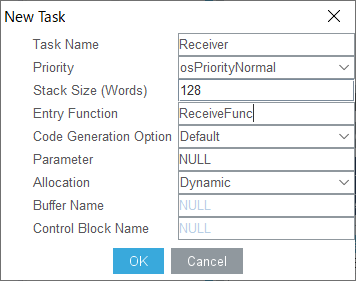
Next, double-click the defaultTask that has been in the list since the beginning, edit the two items as follows, and click OK.
Task Name : Sender
Entry Function : SendFunc
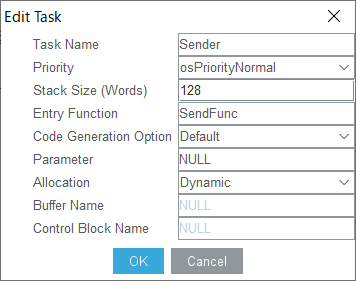
It looks like this.

You can think of task here as meaning the same as thread.
The term “thread” will be used consistently from here on.
Create a message queue
For more information about the message queue, please refer to here.
The green thread on the left will send (put), and the light blue thread on the right will receive (get).
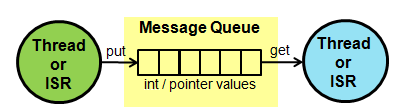
In the description, it says “The data to be passed can be of integer or pointer type.
(The data to be passed can be of integer or pointer type:)
This means that 32-bit data can be sent and received.
Under Mode, select Tasks & Queues in Configuration.
Click on the Add button for Queues at the bottom, and then click on the OK button.
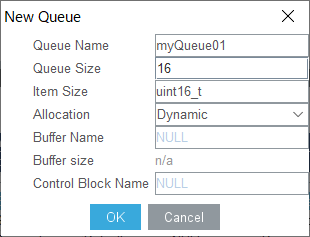
You are now ready to use the message queue. It’s easy.
Coding it
Write the contents of the SendFunc() and ReceiveFunc() functions already prepared in main.c as follows.
void SendFunc(void const * argument)
{
  /* USER CODE BEGIN 5 */
  static uint32_t counter = 0;
  /* Infinite loop */
  for(;;)
  {
    osMessagePut(myQueue01Handle, counter++, 0);
    osDelay(1000);
  }
  /* USER CODE END 5 */
}

void ReceiveFunc(void const * argument)
{
  /* USER CODE BEGIN ReceiveFunc */
  /* Infinite loop */
  for(;;)
  {
    osEvent event = osMessageGet(myQueue01Handle, 0);
    if (event.status == osEventMessage)
    {
      if ((event.value.v & 0x01) == 0)
      {
        HAL_GPIO_WritePin(GPIOA, GPIO_PIN_5, GPIO_PIN_RESET);
      }
      else
      {
        HAL_GPIO_WritePin(GPIOA, GPIO_PIN_5, GPIO_PIN_SET);
      }
    }
  }
  /* USER CODE END ReceiveFunc */
}
Build it
Build it and make sure there are no errors.
If a query window comes up, press Yes.
Now let’s Run – Resume to run the program.
Code Summary
The configurator will do some of the work for us.
In this case, we only had to write the code in the sender and receiver functions.
osDelay()
HAL’s HAL_Delay() is often used for time waiting, and FreeRTOS has a similar function called osDelay().
The argument is in msec.
The unit of the argument is msec. osDelay() waits for time and hands over the process to another thread.
Time Slice
Since SendFunc() and ReceiveFunc() have the same priority, the OS will switch the process in an appropriate time slice without implementing a deliberate switching process like osDelay().
It is defined in FreeRTOS.h as follows. (Switch is performed when configUSE_TIME_SLICING is 1)
#ifndef configUSE_TIME_SLICING
#define configUSE_TIME_SLICING 1
#endif
Try replacing osDelay() written in SendFunc() with HAL_Delay(). You can see that the thread switching is still performed in that state.
Sending side
osMessagePut(myQueue01Handle, counter++, 0);
First argument: value of type osMessageQId obtained by osMessageCreate()
Second argument: 32-bit value to be sent
Third argument: timeout value (0 is specified if there is no timeout)
Receiver
osEvent event = osMessageGet(myQueue01Handle, 0);
Return value: osEvent type
When the status member of this variable event is osEventMessage, the message has been received.
And the event.value.v at that time is the 32-bit value that was sent.
The if() statement says that if the value is an even number
HAL_GPIO_WritePin(GPIOA, GPIO_PIN_5, GPIO_PIN_RESET);
if the value is an odd number, the LED is turned off.
This time, I was able to experience the FreeRTOS message queue relatively easily.
How did you like it? Did you get the LED-blink right?


