
In the previous article, we discussed serial communication using polling.
This time, we will use interrupts for serial communication.
Using interrupts requires more time and effort, but it allows for more detailed processing.
Also, using interrupts allows you to write the process during communication, whereas polling requires post-processing.
The following is the development environment at the time of submission.
PC: Windows 10 OS
IDE: STM32CubeIDE Version1.1.0
Configurator: STM32CubeMX Version5.4.0
Board: STM32Nucleo-F401RE
Create a new project from File – New – STM32 Project.
In the Boart Selector, click on NUCLEO-F401RE from the Boart List to select it and press the Next button.
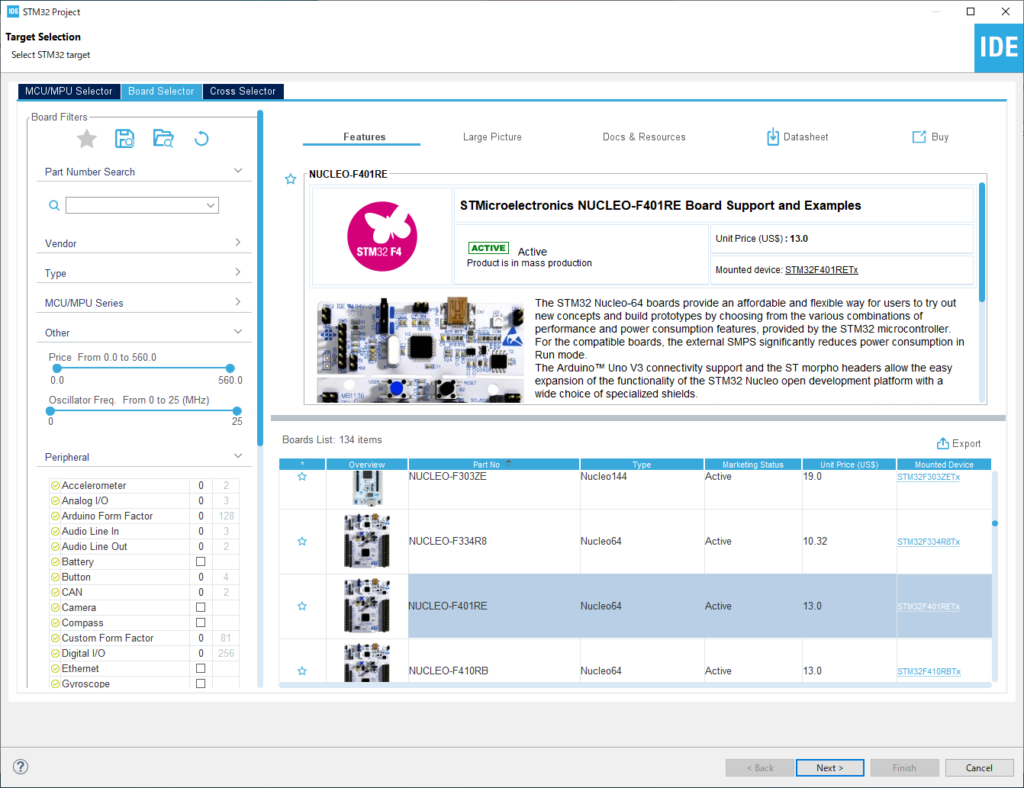
In the Project Name field, enter the project name (for example, F401UartIT in this case) and press the Finish button.
Press the “Yes” button when it asks “Initialize all peripherals with their default Mode?
Allow interrupts in the configurator
Double-click on the light blue icon F401UartIT.ioc that you see in the Project Explorer.
Click on USART2 in Connectivity on the left and check the Enabled checkbox for USART2 global interrupt in the NVIC Interrupt Table on the right.
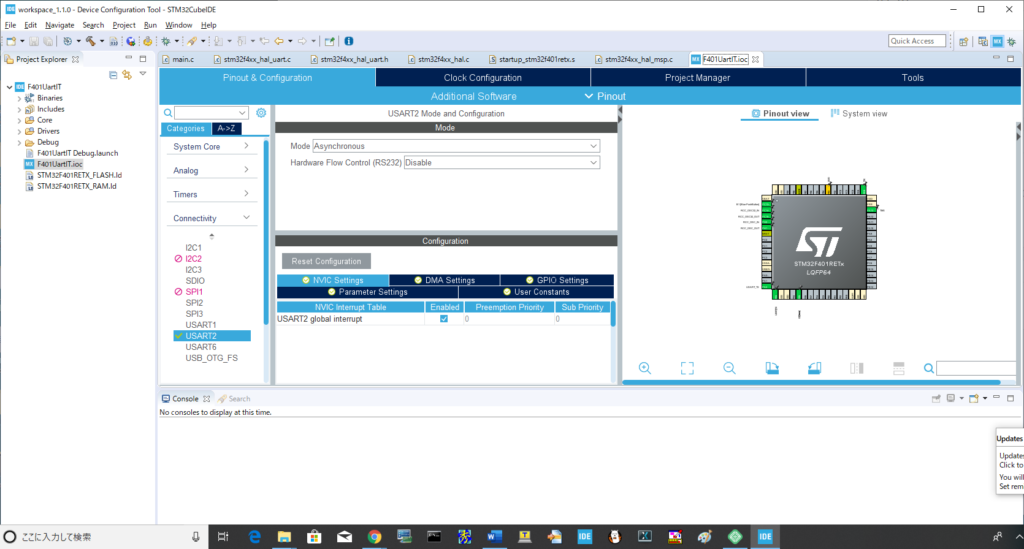
Note that if you do not check this box, it will not enter the interrupt process.
Try coding
Double-click F401UartIT – Core – Src – main.c in Project Explorer to open the file.
First, write two variables as shown below.
Define a variable that signals that reception is complete and a receive buffer.
/* USER CODE BEGIN 0 */
int gUartReceived = 0;

/* USER CODE END 0 */

/**
  * @brief The application entry point.
  * @retval int
  */
int main(void)
{
  /* USER CODE BEGIN 1 */
  uint8_t buffer[256];
  /* USER CODE END 1 */
Next, code the while loop part as follows.
/* USER CODE BEGIN WHILE */
  while (1)
  {
    /* USER CODE END WHILE */

    /* USER CODE BEGIN 3 */
	HAL_UART_Receive_IT(&huart2, buffer, 2);
	while (gUartReceived == 0)
	{
		;
	}
	HAL_UART_Transmit_IT(&huart2, buffer, 2);
	gUartReceived = 0;
  }
  /* USER CODE END 3 */
When the receive interrupt completes, it comes to HAL_UART_RxCpltCallback(), so please write the following code between USER CODE BEGIN and END.
/* USER CODE BEGIN 4 */
void HAL_UART_RxCpltCallback(UART_HandleTypeDef *huart)
{
	gUartReceived = 1;
}
/* USER CODE END 4 */
If two pieces of data are sent from the PC, HAL_UART_RxCpltCallback() will come and set gUartReceived to 1, which will cause it to break out of the while loop and return the sent data.
After you have written this far, build it and make sure there are no errors.
Let’s quickly check what the next function does.
HAL_UART_Receive_IT(&huart2, buffer, 2);
Double-click on this function to select it, right-click, and select Open Declaration. (or press F3)
huart->pRxBuffPtr = pData;
huart->RxXferSize = Size;
huart->RxXferCount = Size;
__HAL_UART_ENABLE_IT(huart, UART_IT_PE);
__HAL_UART_ENABLE_IT(huart, UART_IT_ERR);
__HAL_UART_ENABLE_IT(huart, UART_IT_RXNE);
The first address of the receive buffer is set in the pointer variable of the structure.
Then, the size of the data to be received is set in the size and counter variables.
It also sets the size of the data to be received in the size and counter variables, and triggers an interrupt when it detects an interrupt factor in the receiving system.
Checking the interrupt vector
In STM32, there is an interrupt controller called NVIC.
You can read more about it in the STM32F401 reference manual.
You can download the manual from here.
In section 10 of the manual, there is a vector table where various interrupt factors are described.
USART2 is found in position 38.
This vector table can be found in the source under F401UartIT > Core > Startup > startup_stm32f401retx.s.
Follow the tree and double-click on the file.
On line 197, we found a vector called USART2_IRQHandler.
You can think of the vector as the address of the function.
Double-click on USART2_IRQHandler to select it, then right-click and select Open Declaration.
Select stm32f4xx_it.c as it has two candidates.
Double-click HAL_UART_IRQHandler to select it, right-click and select Open Declaration.
This is where the UART interrupt handling is written.
Let’s take a look at UART_Receive_IT, the part that receives data.
Double click on it to select it, then right click and select Open Declaration.
Summary of the process in the function
After the received data is saved in the buffer, the counter value is set to -1, and when it reaches zero, the reception is completed.
There is HAL_UART_RxCpltCallback in the receive completion process, so if you want to process when reception is completed, you can write it in this function.
In this program, gUartReceived = 1; is used.
HAL_UART_RxCpltCallback has a _weak attribute, so the function is implemented in main.c here.
If you don’t write any function with _weak attribute, the default one will be used.
(It is not an error if the function name is duplicated.
The rest of this article is a bit long, so I will continue in the next article.


