
Hello everyone, nice to meet you.
I’ve been providing topics on stm32 microcontrollers in my Japanese blog, but I’ve come to think that if I wrote in English, more people would be able to read it.
But I’m not good at English. I will try to convert Japanese into English using translation software.
Please forgive me if there are many things that are difficult to read.
STMicroelectronics has released STM32CubeIDE, a free development tool for stm32 microcontrollers.
I used it for a while and was surprised to find such a great tool for free.
If you are familiar with Eclipce-based IDEs, you may find it easy to use.
I will give you a few characteristics.
・No restrictions on codes or usage period
The STM32CubeIDE does not have any restrictions on code or usage period. The code limit is, for example, “the program size is limited to 256KB, so if you want to develop on a larger scale, you have to pay for the full version. The period of use is, for example, “You can use all functions without limitation for the first month of use, and if you want to continue using the program, please purchase the full version.
With no restrictions, students can develop programs with a compatible board and USB cable, which is a great thing. (Of course, you will need a PC for development…)
・Configuration function
By opening a file with the extension ioc in the IDE, you can assign functions to IO pins and implement functions such as timers. In addition, it is possible to generate the initial setting code for the selected function. These functions seem to be integrated into the IDE with the functions of STM32CubeMX, a conventional configurator.
・Support for C++ language
It may be commonplace these days, but both C and C++ languages can be used for development.
The performance and memory capacity of microcontrollers are also increasing, so C++ is becoming easier to handle.
・Easy to refer to variables
There are times when a local variable becomes a strange value when debugging, aren’t there? Have you ever bothered to prepare global variables for debugging?
With this IDE, you can check the correct value of local variables just by hovering the mouse cursor over them. This is a very simple but useful feature.
・Initial Settings for Supported Boards
Using the board selector function, you can perform the initial settings for the stm32 boards released by STMicro. This is also useful because it allows you to start using the board immediately after purchasing a compatible board.
In the past, it was common to read the description of each bit of the built-in registers and write them byte by byte…
The IDE takes care of the time-consuming register settings for the user.
Of course, there are times when detailed settings are needed.
From now on, I will mainly write information related to stm32 microcontrollers in this site, but I would like to warn you about the environment and target audience.
Environment
PC with Windows 10 OS
Target audience
Those who have some understanding of C language and preferably C++ language.
You should be able to read some circuits, as we will be discussing circuits from time to time.
(I’m writing this assuming that you are the target audience.)
I’ve digressed a bit. (^_^)
The software for the development tools can be downloaded from the following site.
You can use it for free, but you will need to register.
Make sure to keep your email address and password when you register.
(You may need it to download other documents later.)
stm32 software-development-tools download site
If you want to try out what it is like, please download the following two documents from here.
STM32CubeIDE (Integrated Development Environment)
STM32CubeMX (initialization code generation tool)
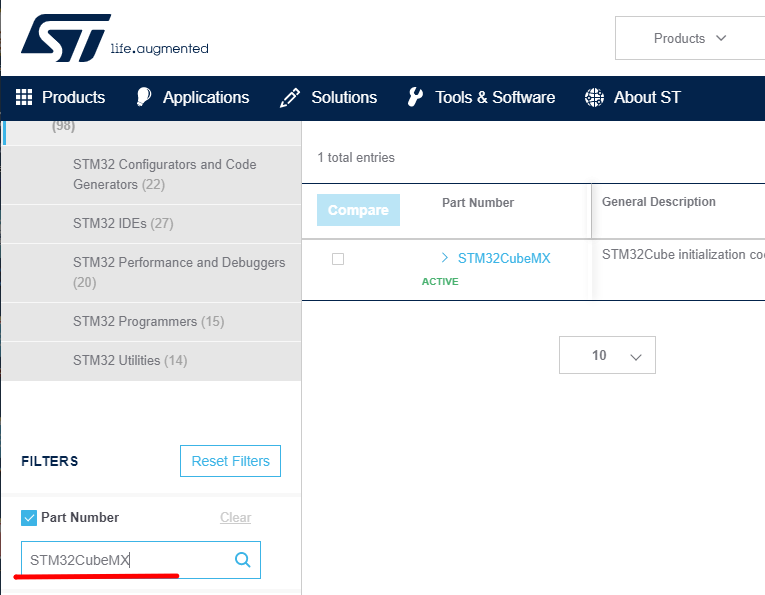
You can search by Part Number in the FILTERS section on the left.
In this article, we briefly introduced the development tools. In the next article, we will start using the board to actually run the program.


