
In this article, we will try to access the SD card using Mbed.
Here is the development environment at the time of posting.
PC: Windows 10 OS
IDE: STM32CubeIDE Version1.3.0
Board: STM32Nucleo-F401RE
Mbed OS2 project files
You can download the Mbed OS2 project here.
However, please note that the boards and environments are limited to the ones listed above.
Preparing the SD card connector
Since we will be connecting to the microcontroller via SPI, I think it is sufficient to prepare a general SD card module.
I used one from a Japanese manufacturer, which is not available worldwide, so I won’t introduce it here.
Wiring it up
I connected it as follows
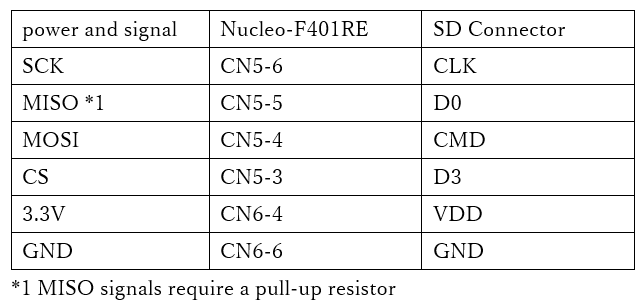
It seems that some cards do not work without pull-up resistors, so I added them.
You can use a pull-up resistor of about 10k.
Here is the information about the connector of Nucleo-F401RE.
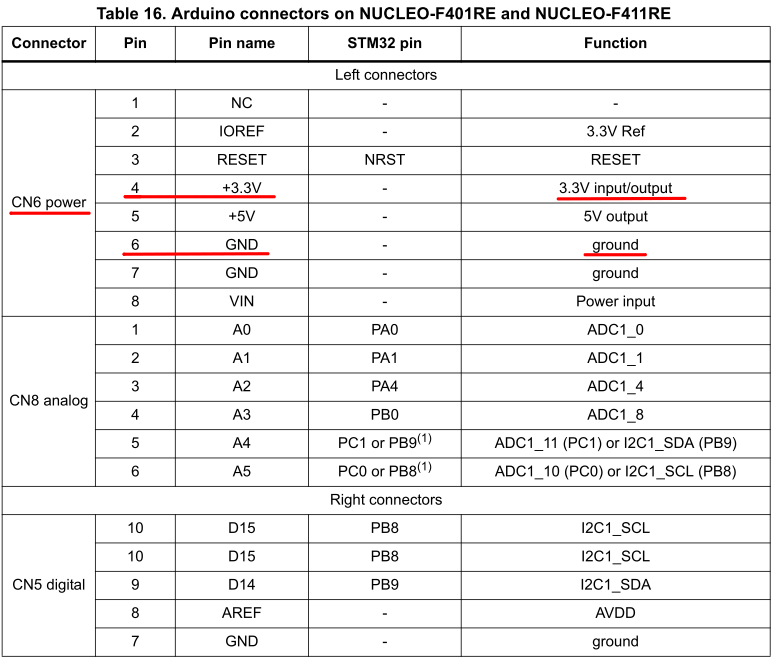
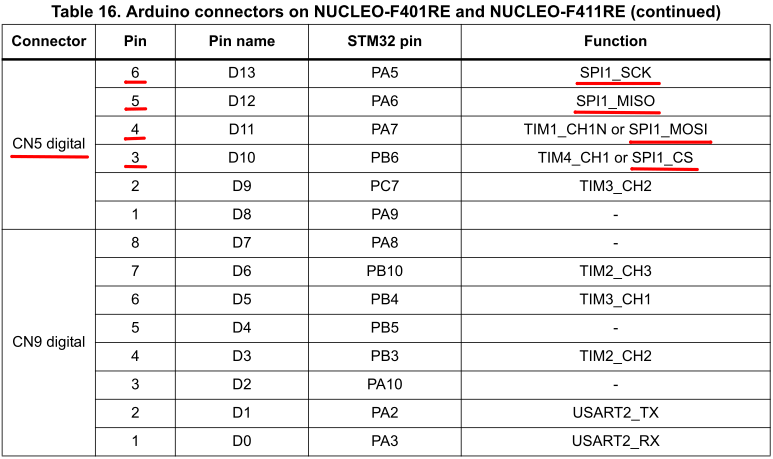
Download the SDFileSystem
To handle SD cards in Mbed OS2, we use SDFileSystem.
There are a lot of things to download, and it can be confusing, but this time I chose here.
Since the “Export to Desktop” feature is not available these days, I imported it into the compiler and exported it from the compiler.
In the program workspace of the Mbed compiler, right-click on SDFileSystem_Test, select Export Program, and click
Export Target: NUCLEO-F401RE
Export Toolchain: Sw4STM32
Select Export Toolchain: Sw4STM32 and Export.
Copy the SDFileSystem into your project
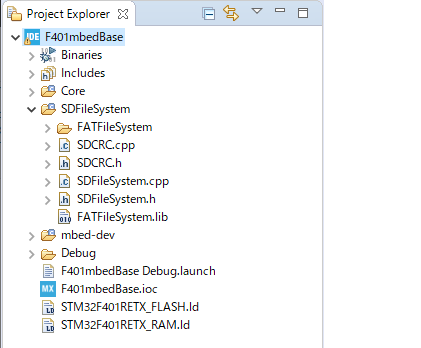
Unzip the files and copy them to your project in the IDE.
For example, the following figure shows the F401mbedBase project with SDFileSystem added.
Add source and file paths
In the Project – Properties – C/C++ General – Paths and Symbols – Includes tab
SDFileSystem
SDFileSystem/FATFileSystem
SDFileSystem/FATFileSystem/ChanN
to Language C and C++.
Also, in Project – Properties – C/C++ General – Paths and Symbols – Source Location tab
Add the SDFileSystem folder in the Add Folder tab.
Try to build it
First of all, when I build with this, I get an error.
The FATFileSystem seems to have been revised, so download that one.
Import it into the compiler from here.
If you select Sw4STM32 as the Toolchain when exporting this, an error will occur for some reason, so select ZIP.
Export Target: NUCLEO-F401RE
Export Toolchain: ZIP Archive (with repositories)
Unzip the downloaded file and replace the FATFileSystem in the IDE’s project tree.
You can do this in Window Explorer.
After the replacement, select File – Refresh in the IDE to tell the IDE that the file contents have been replaced.
Coding
#include "SDFileSystem.h"

int main(void)
{
  /* USER CODE BEGIN 1 */

	Serial s(SERIAL_TX, SERIAL_RX, "SERIAL1");

	s.baud(9600);
	s.format(8, SerialBase::None, 1);

	SDFileSystem sd(SPI_MOSI, SPI_MISO, SPI_SCK, SPI_CS, "sd");
	mkdir("/sd/mydir", 0777);

	FILE *fp = fopen("/sd/mydir/sdtest.txt", "w");
	if (fp == NULL)
	{
		s.printf("File open error!\r\n");
	}
	} else
	{
		s.printf("File open success!\r\n");
		fprintf(fp, "Hello fun SD Card World!");
	}
	fclose(fp);
Schematic description of the code
We are using the Serial class to output printf.
As usual, I used Tera Term on my PC with VCP for this partner.
If you are not familiar with VCP, please see here.
Please refer to SDFileSystem.h for building SDFileSystem (pin layout).
Check the following header file for definitions of SPI_MOSI, SPI_MISO, SPI_SCK, and SPI_CS.
The pins are defined to match the connection.
mbed-dev/targets/TARGET_STM/TARGET_STM32F4/TARGET_STM32F401xE/TARGET_NUCLEO_F401RE/PinNames.h
The rest of the code is almost the same as the sample code.
It creates a directory with mkdir(), opens the file and writes “Hello fun SD Card World!” on success.
The number 777 is a number that determines the permissions, called permissions.
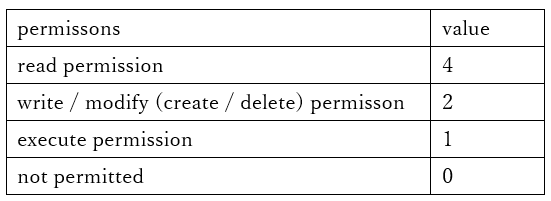
Read, write, and execute permissions are directed to the “owning user”, “owning group”, and “other users”.
It means anything is possible.
Build & Run
In our environment, we were able to write successfully.
I was able to read the SD with a card reader and confirm that “Hello fun SD Card World!” was written to the sdtest.txt file in the mydir directory.


