
This time it is about the debugger.
Here is the development environment at the time of posting.
PC: Windows 10 OS
IDE: STM32CubeIDE Version1.3.0
Board: STM32Nucleo-F401RE
Dancing with STM32? I’m sure many of you are wondering what that is.
Let’s take a look.
The steps play an important role in the dance.
In the debugger as well, step execution is a major key to debugging.
In the IDE, step execution is done by pressing F5 or F6.
It should be executed line by line, step by step, but sometimes it executes the same function over and over again or jumps from one place to another.
In such cases, you should suspect optimization.
Optimization is set on a per-file basis.
Now open a project and right click on main.c in the Project Explorer and select Properties.
When the window comes up, select Optimaization in the Tool Settings tab of C/C++ Build – Settings.
If you are experiencing strange behavior in step execution, the Optimization level here may be set to Optimize for size or Optimize for speed.
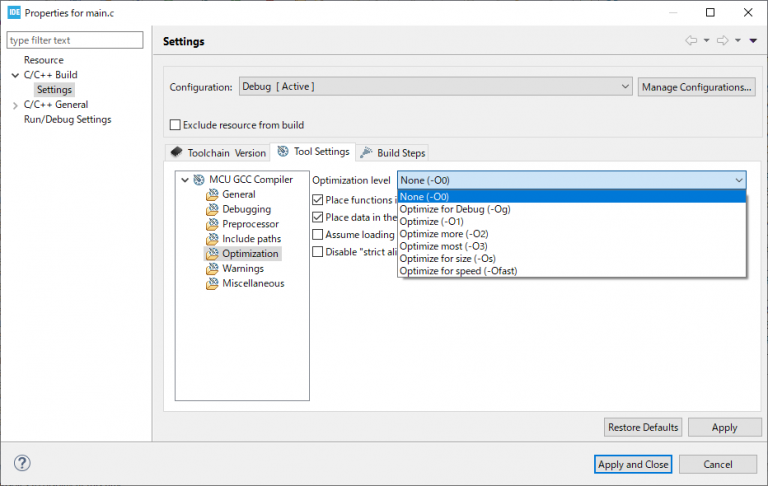
The optimization settings are as follows.
-O0
This is the default optimization setting. This setting disables most of the optimizations and creates the best correlation between the built image and the application source code.
-O1
This provides a better performance optimization compared to -O0. ARM recommends this option for debugging.
-O2
This provides a better performance optimization compared to -O1. It also reduces the information available for debugging and may increase the image size.
-O3
This provides a better performance optimization compared to -O2. It also makes less information available for debugging and may increase the image size.
-Ofast
This provides better performance optimization compared to -O3. It also makes less information available for debugging and may increase the image size. This level of optimization may cause the ARM compiler to violate certain language standards.
-Omax
This provides a better performance optimization compared to -Ofast. It also reduces the information available for debugging and may increase the image size. This level of optimization may cause the ARM compiler to violate certain language standards. For best performance, ARM recommends this option.
-Os
This option reduces the size of the code and makes less information available for debugging. Using this option may slow down your code.
When debugging, set this to None so that you can step and dance correctly.
Please check this out if your step execution is behaving strangely.


